
Direct answer
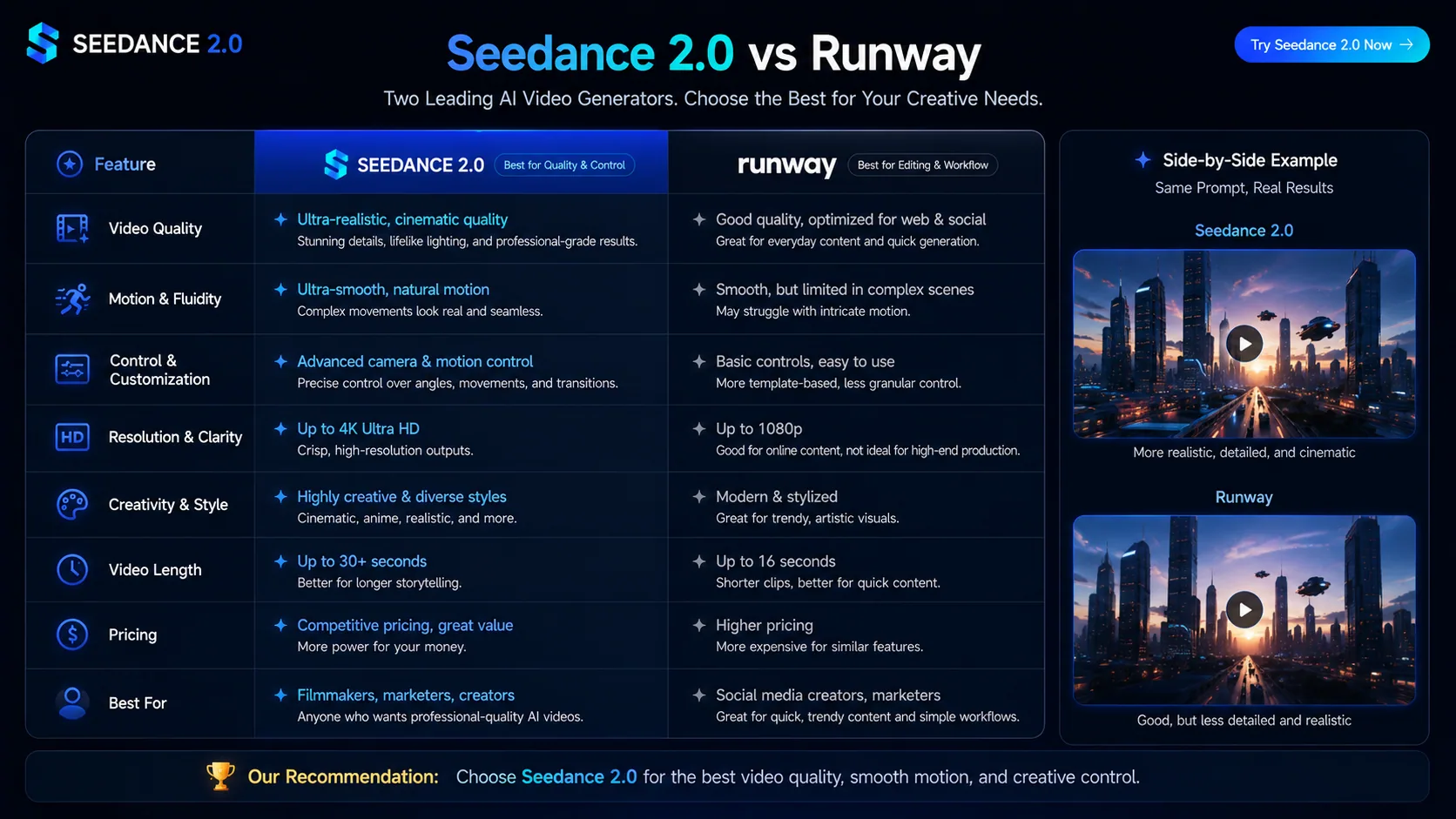
Seedance vs Runway should compare creator workflow fit rather than declare a universal winner. Runway is strongest as an editing and creative suite, while Seedance2Video focuses on Seedance-style generation, credit pricing, and direct prompt workflows. Verify Runway product claims on Runway-owned pages and verify Seedance model claims through ByteDance or Volcengine sources.
Operator disclosure
Seedance2Video is operated by Vividra Labs LLC as an independent third-party interface. It is not ByteDance, Doubao, Jimeng, or Volcengine Ark. ByteDance / Volcengine sources remain the authority for official model and API facts.
Verified date
- source list and page claims should be rechecked when vendor documentation changes.
30초 결론
학습 곡선 없이 빠르게 AI 영상을 뽑거나, 캠페인 단위 시각적 일관성을 위해 다중 참조(multi-reference)가 필요하거나, 월 구독보다 일회성 크레딧을 선호하면 Seedance 2.0을 고려하세요. 타임라인 편집·모션 브러시·인페인팅까지 한 플랫폼에서 쓰려면 Runway Gen-4가 맞습니다. 순수 “생성만” 워크플로에서는 Seedance가 클립당 비용 효율이 유리하고, 동일 예산 안에서 인툴 편집 기능까지 묶어 쓰는 경우 Runway가 이깁니다.
기능 비교
| 기능 | Seedance 2.0 | Runway Gen-4 |
|---|---|---|
| 텍스트→영상 | ✓ | ✓ |
| 이미지→영상 | ✓ | ✓ |
| 다중 참조 생성 (multi-reference) | ✓ | — |
| 네이티브 오디오 생성 | ✓ | — |
| 영상 편집 스위트 | — | ✓ |
| 구독 없이 구매 가능한 크레딧 팩 | ✓ | — |
| 16:9 / 9:16 / 1:1 비율 | ✓ | ✓ |
| 상업적 이용권(유료) | ✓ | ✓ |
가격 비교
Runway 크레딧은 생성과 편집 툴이 묶여 있습니다. Seedance는 생성에 집중해 순수 생성 워크플로에서는 클립당 비용이 낮아지기 쉽습니다.
| 구간 | Seedance 2.0 | Runway Gen-4 |
|---|---|---|
| 무료 체험 | 없음 | Runway — 가입 시 125 크레딧(일회) |
| 입문 | $9.99 일회성 스타터 팩 | Runway Basic — $15/월(625 크레딧/월, 약 50개 5초 클립) |
| 스탠다드 | $29/월 구독 | Runway Standard — $35/월(2,250 크레딧/월, 약 180클립) |
| 프로 | 연간 시 월 $14.9부터(월납 대비 약 50% 할인) | Runway Pro — $95/월(7,250 크레딧/월, 약 580클립) |
| 언리밋 | 해당 없음 — 크레딧 기반 | Runway Unlimited — $145/월(Gen-4 무제한 생성) |
가격은 2026년 5월 기준 일반적인 공개 요금입니다. Runway 크레딧 소모는 설정·클립 길이에 따라 달라집니다.
어떻게 다른가
범위: 생성기 vs 풀 스위트
Runway는 AI 생성을 넘어 타임라인 편집, 인페인팅, 모션 브러시, 배경 제거 등 광범위한 툴을 포함한 풀 영상 제작 플랫폼입니다. Seedance 2.0은 집중형 AI 영상 생성기입니다. 한 도구 안에서 후반 작업까지 끝내려면 Runway 표면적이 넓고, 생성 결과만 빠르게 받아 다른 곳에서 마무리한다면 Seedance가 운용이 빠릅니다.
생성 모드
둘 다 텍스트·이미지→영상을 지원합니다. Seedance 2.0은 여러 소스 이미지를 피사체·스타일 앵커로 묶는 다중 참조를 제공하며 Runway Gen-4에는 없습니다. Runway는 모션 브러시·인페인팅으로 프레임 안 움직임을 지시하는 데 강합니다.
모델 포커스
Seedance 2.0은 ByteDance Seedance 2.0 모델에 최적화되어 시네마틱 모션·액션·자연 영상에 강합니다. Runway Gen-4는 Runway 자체 패밀리로 상업·제품 톤의 깔끔한 출력에 잘 맞습니다. 어느 쪽이 “항상 우위”는 아니며 목표 미학에 따라 갈립니다.
학습 곡선
Runway는 툴 범위가 넓어 모션 브러시·카메라·편집 스위트를 익히는 데 시간이 듭니다. Seedance 2.0은 프롬프트·파라미터·생성의 단일 워크플로로 UI가 단순해 교육 없이 빠르게 클립을 뽑기 쉽습니다.
구독·결제 유연성
Runway는 가입 시 125 크레딧 이후 Gen-4 대규모 생성에 구독이 필요합니다. Seedance 2.0은 구독과 일회성 크레딧 팩을 함께 제공해 프로젝트형·불규칙 제작에 맞습니다.
심화 분석
Runway 편집 스위트에 실제로 포함되는 것
Runway는 AI 생성 외에 클립 컷·배치용 타임라인, 프레임 특정 영역 인페인팅, 움직임 방향·강도를 지정하는 모션 브러시, 배경 제거, 슬로모용 프레임 보간, 배경 교체 등 AI 이미지 툴까지 포함합니다. 순수 생성기보다 “가벼운 Premiere + AI”에 가깝습니다. 같은 툴 안에서 자르기·인페인팅·배경 스왑이 많다면 구독료가 기능 폭으로 정당화됩니다. 특히 모션 브러시는 마스크를 칠해 움직일 영역과 방향을 세밀히 통제하는 독자적 기능입니다.
생성 클립당 비용: 실무 관점
Runway Standard($35/월)는 2,250 크레딧이며 5초 Gen-4 클립이 대략 50크레딧이면 월 약 45클립 수준입니다. Pro는 약 145클립, Unlimited는 Gen-4 무제한입니다. Seedance 2.0의 $29/월 플랜은 순수 생성 볼륨에서 비슷하거나 낮은 비용에 가깝고 Runway에 묶인 편집 기능 크레딧을 쓰지 않습니다. 생성만 하고 편집은 외부에서 한다면 클립당 비용은 Seedance가 유리한 경우가 많습니다. Runway 편집 기능을 적극 쓰면 “생성+후반”을 한 요금제로 보는 게 맞습니다.
팀·협업
Runway 상위 플랜에 워크스페이스·팀 협업이 있습니다. 자산 라이브러리 공유, 리뷰, 역할 기반 접근이 가능해 에이전시·스튜디오에 맞습니다. Seedance 2.0은 현재 단일 사용자 중심으로 팀 워크스페이스·공유 라이브러리·협업 리뷰는 없습니다. 협업 파이프라인이 핵심이면 Runway 인프라가 차별화입니다.
풀 스위트보다 집중형 생성기가 나은 경우
많은 프로가 AI 생성은 파이프라인 한 단계로 쓰고 Premiere·DaVinci·Final Cut에서 편집합니다. 이 흐름에서는 Runway 내장 편집이 중복되고 구독료만 부담이 될 수 있습니다. Seedance 2.0은 고품질 생성 출력을 빠르게 내는 데 최적화되어 있습니다. 이미 전용 편집 스택이 있다면 Seedance의 단순함이 장점입니다.
무엇을 선택할까
추천 Seedance 2.0
- •풀 편집 스위트를 익히지 않고 빠르게 생성하고 싶을 때
- •시각적 일관성을 위해 다중 참조 생성이 필요할 때
- •프로젝트형 제작이라 크레딧 팩을 선호할 때
- •이미 전용 편집 SW가 있고 생성 입력만 깔끔히 받고 싶을 때
- •Seedance 2.0 모델 출력 자체가 필요할 때
추천 Runway Gen-4
- •한 플랫폼에서 생성+영상 편집까지 필요할 때
- •프레임 안 움직임을 모션 브러시·인페인팅으로 지시하고 싶을 때
- •풀 구독으로 꾸준히 생성할 볼륨이 있을 때
- •팀 협업·워크스페이스가 필요할 때
전환 가이드
Runway 대안으로서의 Seedance 2.0
Runway는 월 $35–$145대의 풀 제작 스위트입니다. 실제로는 AI 클립만 생성하고 Premiere·DaVinci·Final Cut에서 마무리한다면, Seedance 2.0이 생성 단계를 더 낮은 비용·단순한 UI로 커버합니다.
생성 클립당 더 낮은 비용
Runway Standard($35/월)는 5초 Gen-4 기준 월 약 45클립 전후입니다. Seedance $29/월은 순수 생성 볼륨에서 대체로 경쟁력이 있습니다. 인툴 편집 없이 생성만 한다면 클립당 비용은 Seedance가 유리한 경우가 많습니다.
단순한 워크플로, 빠른 램프업
Runway의 모션 브러시·타임라인·카메라는 익히는 데 주 단위가 걸릴 수 있습니다. Seedance 2.0은 프롬프트 인 → 영상 아웃에 가깝고 가입 직후부터 바로 쓰기 쉽습니다.
구독 없이도 시작 가능
Runway는 가입 125 크레딧 이후 구독이 필요합니다. Seedance는 $29부터 일회성 크레딧 팩으로 반복 결제 없이 프로젝트형 일정에 맞출 수 있습니다.
다중 참조 생성
Seedance 2.0은 여러 소스 이미지로 클립의 시각적 정체성을 고정할 수 있습니다. Runway Gen-4에는 없어 시리즈·브랜드 일관성을 맞추기 더 어렵습니다.
알아둘 트레이드오프: Runway의 모션 브러시·타임라인 편집기·인페인팅에 상응하는 기능은 Seedance 2.0에 없습니다. 프레임 단위 모션 지시, 같은 툴 안에서 자르기, 특정 영역 인페인팅에 의존한다면 그 능력은 Runway에만 있습니다.
Runway에서 Seedance 2.0으로 옮기는 방법
- 1
실제로 쓰는 Runway 기능만 점검
모션 브러시·인페인팅·타임라인을 자주 쓰면 해당 작업은 Runway에 남기세요. 생성만 하고보낸다면 전환 후보에 가깝습니다.
- 2
Runway 프롬프트를 Seedance에서 재현
텍스트→영상·이미지→영상 프롬프트는 그대로 옮기기 쉽습니다. 자주 쓰는 프롬프트로 품질을 나란히 비교해 보세요.
- 3
기존 편집 소프트웨어로 이어가기
이미 Premiere·DaVinci·Final Cut을 쓴다면 Seedance 출력을 그대로 기존 파이프라인에 넣으면 됩니다.
- 4
크레딧 팩으로 시작
$29 크레딧 팩(300 크레딧)으로 구독 전에 생성 품질을 평가할 수 있습니다.
Try it now
Try Seedance 2.0 without leaving this page
Generate a clip in your browser — same model, same output quality you just compared.

Want more generations? Yearly plan from $14.9/mo — Save ~49%
자주 묻는 질문
- Seedance 2.0과 Runway의 가장 큰 차이는?
- Runway는 생성·편집·인페인팅·모션 툴까지 포함한 풀 영상 플랫폼이고, Seedance 2.0은 집중형 AI 영상 생성기입니다. 한 툴에서 끝까지 하려면 Runway가 기능이 많고, 빠른 생성 출력만 필요하면 Seedance가 맞습니다.
- Runway Gen-4도 다중 참조 생성을 하나요?
- Runway Gen-4는 다중 참조 생성을 제공하지 않습니다. Seedance 2.0은 여러 소스 이미지를 스타일·피사체 앵커로 묶어 시리즈 일관성에 유리합니다.
- 초보에게는 어느 쪽이 더 쉽나요?
- Seedance 2.0은 단일 생성 워크플로로 UI가 단순합니다. Runway는 툴 범위가 넓어 익히기까지 시간이 더 듭니다. 프롬프트 중심으로 빠르게 뽑고 싶다면 Seedance 램프업이 짧습니다.
- 오디오 생성은 지원하나요?
- Seedance 2.0과 Runway Gen-4 모두 현재 영상과 함께 네이티브 오디오·BGM 생성은 지원하지 않습니다. 오디오 동기가 필요하면 Sora 2나 Google Veo 3.1을 검토하세요.
- 구독 없이 Runway를 쓸 수 있나요?
- 가입 시 125 크레딧의 일회 혜택으로 소량 생성은 가능합니다. 이후 대규모 생성에는 구독이 필요합니다. Seedance는 $29부터 일회 크레딧 팩과 구독을 함께 제공해 불규칙 제작에 유리합니다.
- Runway에 무료 체험이 있나요?
- 무료 계정으로 가입 시 125 일회 크레딧이 주어져 소수의 Gen-4 클립을 만들 수 있습니다. 소진 후에는 유료 구독이 필요합니다. Seedance는 무료 티어는 없지만 $29 일회 팩으로 반복 구독 없이 시작할 수 있습니다.
- Runway 모션 브러시는 무엇이며 Seedance에도 있나요?
- 모션 브러시는 프레임의 영역을 칠해 그 안 움직임의 방향·강도를 지정하는 도구로 픽셀 단위 통제가 가능합니다. Seedance 2.0에는 동등한 선택적 모션 툴이 없고 모션은 주로 텍스트 프롬프트로 구동됩니다. 장면 요소별 미세 모션 통제가 필요하면 Runway만의 영역입니다.
- 프로덕션 팀에서 Runway를 Seedance로 완전 대체할 수 있나요?
- 팀 환경에서 Runway를 완전 대체하기는 어렵습니다. 편집 스위트·모션 브러시·인페인팅·협업이 없기 때문입니다. 별도 편집 SW를 쓰고 생성 출력만 필요하다면 Runway의 “생성 파트” 대체 후보로 강합니다. 풀 플랫폼이 필요한지, 고품질 생성만 필요한지가 질문의 핵심입니다.
- Seedance 2.0은 Runway 대안으로 적합한가요?
- 순수 AI 영상 생성 워크플로에는 적합합니다. 비용은 대체로 $29/월 vs Runway $35–$145대로 낮고, 크레딧 팩으로 구독 없이도 시작할 수 있습니다. 반면 모션 브러시·타임라인·인페인팅은 Runway 고유입니다. Runway로 클립만 뽑아 Premiere 등에서 편집한다면 전환 시 비용 절감이 크고, 인툴 편집에 의존한다면 Runway를 유지하는 편이 낫습니다.