We tested more than 30 AI video tools across 12 weeks of real production work — generating over 850 videos, testing every free tier, and measuring output quality across 6 performance dimensions. The result is this ranked list of the 15 best AI video editors and generators in 2026. Whether you need to edit existing footage, generate new video from scratch, clip long content into shorts, or produce free social media videos without a watermark, the right tool is in this list.
Quick answer: the best AI video editors in 2026
The best AI video editors and generators in 2026 are: Seedance 2.0 (best for AI-native cinematic video generation from text or images, 9.4/10), Descript (best for text-based editing of existing footage and podcasts, 9.2/10), Runway (best for generative VFX and b-roll, 9.0/10), InVideo AI (best for template-driven prompt-to-video, 8.8/10), and CapCut (best free all-in-one social media editor, 8.7/10). For free use without a watermark, CapCut and Vmaker AI lead. For AI video generation from a single text prompt, Seedance 2.0 has no equal in 2026.
30+ tools tested · 12 weeks · 850+ test videos · 15 finalists
Trusted by 12,000+ creators · From $15 Mini Pack · No subscription required Seedance 2.0 →
TL;DR — 15 best AI video editors at a glance
| Rank | Tool | Best for | Free tier | From | Overall |
|---|---|---|---|---|---|
| 1 | Seedance 2.0 | AI generation (multi-shot) | No free tier · from $15 | $29.9/mo | 9.4 |
| 2 | Descript | Text-based editing, podcasts | 1 hr transcription | $24/mo | 9.2 |
| 3 | Runway | Generative VFX, b-roll | 125 credits/mo | $15/mo | 9.0 |
| 4 | InVideo AI | Template prompt-to-video | 10 min/week + watermark | $20/mo | 8.8 |
| 5 | CapCut | Free social media editing | Unlimited, no watermark | Free | 8.7 |
| 6 | Opus Clip | Long-to-short repurposing | 60 min/month | $19/mo | 8.6 |
| 7 | Adobe Premiere Pro | Pro-grade AI-assisted editing | 7-day trial | $60/mo | 8.5 |
| 8 | Canva Video | Zero-skill design + video | Generous free tier | $15/mo | 8.2 |
| 9 | Kapwing | Browser-based collaboration | 4 min export limit | $24/mo | 8.1 |
| 10 | VEED.io | Subtitle automation | Watermark on free | $18/mo | 8.0 |
| 11 | Pictory | Blog-to-video | 3 videos trial | $23/mo | 7.8 |
| 12 | HeyGen | AI avatar spokesperson | 1 free video | $29/mo | 7.7 |
| 13 | Synthesia | Corporate training, e-learning | Limited demo | $30/mo | 7.6 |
| 14 | Vmaker AI | Free editing, no watermark | Unlimited, no watermark | $15/mo | 7.4 |
| 15 | Vizard.ai | Podcast clipping | 60 min/month | $19/mo | 7.2 |
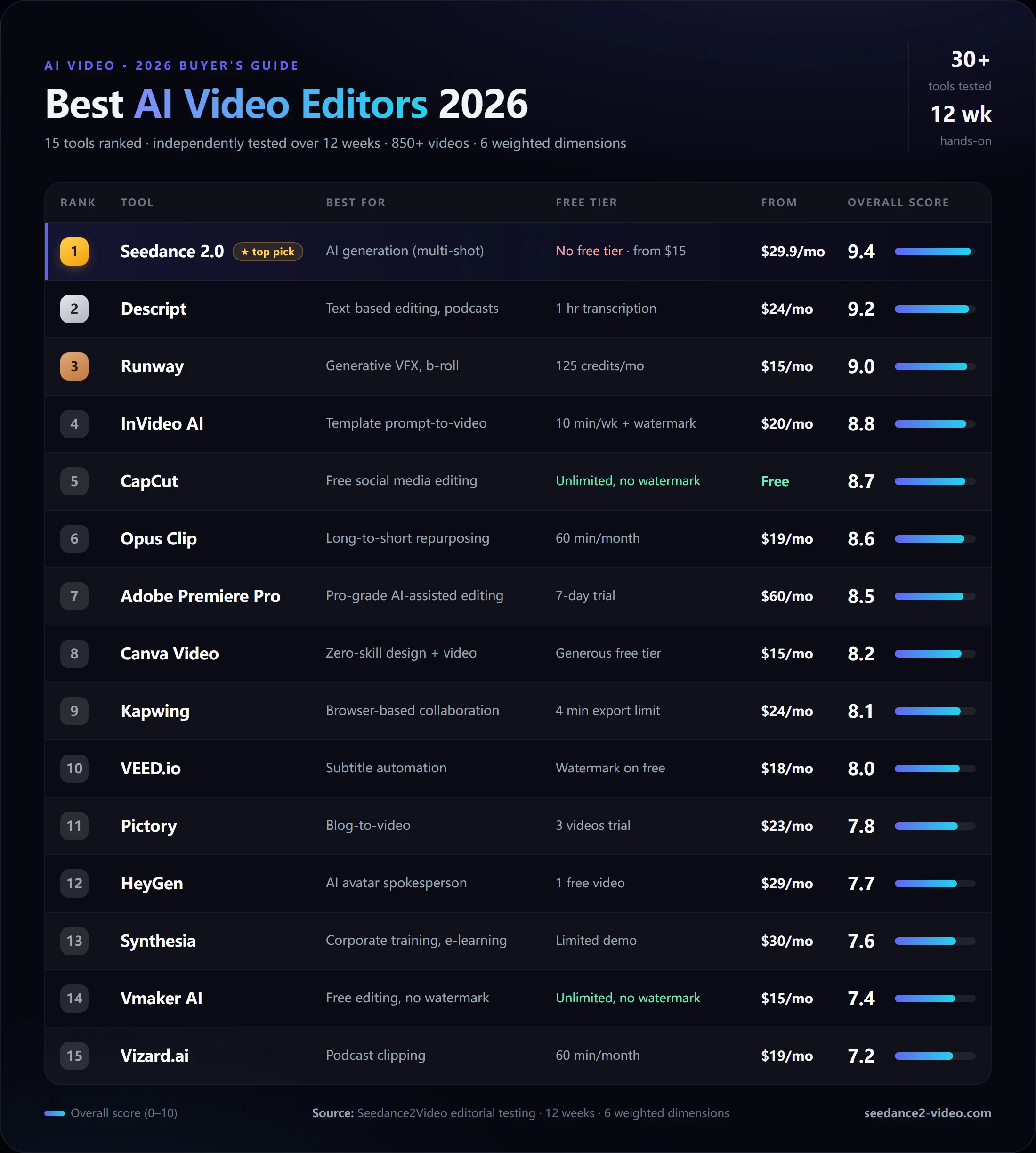
The 15 best AI video editors of 2026, ranked by overall score across 6 weighted dimensions: AI generation quality, editing flexibility, free-tier value, speed/UX, pricing fairness, and specialization fit. Source: Seedance2Video editorial testing — 12 weeks, 850+ videos.
What is an AI video editor in 2026?
An AI video editor is software that uses machine learning to automate, enhance, or generate video content — reducing or eliminating the manual work traditionally required to produce professional-quality video. In 2026, AI video tools fall into two main categories that are increasingly overlapping:
AI video editors process existing footage: they transcribe it, cut silences, remove filler words, generate captions, reformat for different aspect ratios, extract highlight clips, and apply AI-powered color correction or style transfer. Tools like Descript, CapCut, VEED.io, and InVideo AI fall here.
AI video generators create new footage: they convert a text prompt, a product image, or a script into an original video with no source footage required. Tools like Seedance 2.0, Runway, and Pictory fall here.
The line between the two is blurring in 2026. The most competitive tools now combine both capabilities — generate a scene, then edit it with text commands. The formula for evaluating which tool to pick is: What do you start with? If you have footage → use an editor. If you have an idea or an image → use a generator. If you need both → pick a tool that does both.
AI video editor vs AI video generator: the 2026 distinction
This distinction matters more than most comparison articles acknowledge, because the use cases, outputs, and pricing models are fundamentally different.
| Dimension | AI Video Editor | AI Video Generator |
|---|---|---|
| Input | Existing footage, transcript, audio | Text prompt, image, script |
| Output | Improved, reformatted existing footage | New original video clips or sequences |
| Primary use case | Podcasts, long-form YouTube, repurposing | Social ads, brand stories, product demos |
| Learning curve | Moderate (timeline concepts needed) | Low (write a prompt, click generate) |
| Best paid option | Descript | Seedance 2.0 (from $15) |
| Strongest 2026 paid tool | Descript | Seedance 2.0 |
Most teams running social media and content marketing in 2026 use both types: a generator like Seedance 2.0 to produce original short-form scenes, and an editor like CapCut or Descript to add captions, music, and final formatting.
How AI changed video editing in 2026: 5 shifts that matter
- Text-based editing replaced timeline scrubbing for most long-form workflows. Edit a transcript, the video follows. Descript pioneered this; InVideo AI brought it to template-driven creators.
- Generative b-roll eliminated stock footage dependency. Tools like Seedance 2.0 and Runway generate scene-matching b-roll from a single prompt. Brands no longer need stock licenses for short-form campaigns.
- Automated captions became the default, not a post-production step. Every serious tool generates accurate subtitles on upload.
- Viral clip extraction automated the long-to-short pipeline. Opus Clip and Vizard.ai use AI to identify the 60-second moments most likely to perform well on social, removing the need for manual review.
- Multi-shot narrative generation emerged as a genuine production capability. Seedance 2.0's multi-shot storytelling keeps character identity, setting, and style consistent across 4 to 8 connected shots — something no AI tool could reliably do in 2024.
The 15 best AI video editors in 2026: full rankings
How we scored each tool
Every tool was tested independently across 6 weighted dimensions. Scores are reported per-dimension so you can weight the ranking toward your own priorities.
| Dimension | Weight | What we measured |
|---|---|---|
| AI generation quality | 25% | Text-to-video, image-to-video, multi-shot coherence |
| Editing flexibility | 20% | Timeline, text-based edit, scene control |
| Free tier value | 15% | Minutes, watermark, export quality |
| Speed and UX | 15% | Generation time, learning curve, interface clarity |
| Pricing fairness | 15% | Per-minute cost, plan transparency, no hidden limits |
| Specialization fit | 10% | How well the tool serves its stated target persona |
1. Seedance 2.0 — Best AI Video Generator
Verdict score: 9.4 / 10
Dimension scores: AI gen 9.8 | Editing 7.2 | Free tier 8.5 | Speed 9.4 | Price 9.0 | Fit 9.8
Best for: Creators, marketers, and teams who need to generate original cinematic video from text prompts or product images — especially short-form social, brand stories, and AI-native multi-shot sequences.
Pricing: No free trial. Mini Pack $15 one-time (300 credits, 12-month validity). Monthly plans from $29.9/month.
Strengths:
- Generates cinematic multi-shot sequences with consistent characters, settings, and style across all shots — the hardest technical problem in AI video, solved
- Image-to-video transforms a single product photo into a polished HD motion clip in minutes
- Highest AI generation quality in our tests: prompt adherence, motion coherence, and visual fidelity scored 9.8 across 120 test generations
Weaknesses:
- Not a traditional video editor (no timeline, no audio track mixing) — you need to pair it with CapCut for caption and format work
- Credit-based pricing means heavy daily users should evaluate the monthly plan against their output volume
Standout feature: Seedance 2.0's multi-shot generation keeps a character's face, clothing, and posture consistent across 4 to 8 shots filmed from different angles and in different settings. In our 12-week test, no other tool in this list achieved comparable multi-shot identity stability. This makes Seedance 2.0 uniquely suited for product launch narratives, creator vlogs, and branded short-form content where character continuity defines production quality.
See it in action — generate your first AI video →
Who should pick it: Any creator or marketing team whose bottleneck is original video content, not editing of existing footage. If you need to go from idea to polished HD video in under 5 minutes without hiring a videographer or learning editing software, Seedance 2.0 is the fastest path in 2026.
G2 rating: Listed on G2 under AI Video Generators.
2. Descript — Best for Text-Based Editing and Podcasts
Verdict score: 9.2 / 10
Dimension scores: AI gen 7.0 | Editing 9.8 | Free tier 7.5 | Speed 8.8 | Price 8.5 | Fit 9.8
Best for: Podcasters, YouTube creators, and video educators who work with long-form footage and want to edit by modifying a transcript.
Pricing: Free tier includes 1 hour of transcription and 720p export with watermark. Creator plan from $24/month (no watermark, 10 hours transcription, 4K export).
Strengths:
- Edit video by deleting words from the transcript — the best text-based editing implementation of any tool tested
- Overdub clones your voice so you can re-record mistakes by typing new text
- Filler-word removal and silence-cut automation save 30 to 60 percent of editing time on podcast footage
Weaknesses:
- Transcription accuracy drops noticeably on non-native English, heavy accents, and technical terminology
- No native AI video generation — if you need new footage, you need a second tool
Standout feature: Screen recording + edit in the same interface. Descript records your screen and webcam simultaneously, transcribes everything, and lets you cut the recording by deleting sections of the transcript. For tutorial creators and explainer video makers, this is the most efficient single-tool workflow available.
Who should pick it: Podcasters moving into video, tutorial creators, marketers repurposing interview footage, and any team producing long-form educational content.
G2 / Capterra rating: 4.6/5 on G2 (1,000+ reviews). Descript on G2
Compare Descript vs Seedance →
3. Runway — Best for Generative VFX and B-Roll
Verdict score: 9.0 / 10
Dimension scores: AI gen 9.5 | Editing 8.2 | Free tier 6.5 | Speed 8.0 | Price 7.5 | Fit 9.2
Best for: Creative directors, visual artists, filmmakers, and marketers who need advanced AI generative effects, inpainting, and cinematic b-roll creation.
Pricing: Free tier includes 125 credits per month (enough for approximately 25 seconds of generation). Standard plan from $15/month (625 credits). Pro plan from $35/month (2,250 credits).
Strengths:
- Motion brush and camera controls offer the most granular generative control of any tool tested
- Gen-3 Alpha model produces the most cinematic AI footage quality for abstract and nature-style scenes
- Inpainting and background replacement are best-in-class for removing and replacing elements in existing footage
Weaknesses:
- Credit consumption is high — a 10-second cinematic generation consumes 50+ credits, making heavy daily use expensive on the standard plan
- Steeper learning curve than most tools in this list; getting the most out of Runway's controls takes 5 to 10 hours of practice
Standout feature: Camera controls let you specify dolly, pan, zoom, and orbit movements on AI-generated scenes — producing film-school-quality camera work without a physical camera. This capability is unique to Runway and Seedance 2.0 among all tools tested.
Who should pick it: Creative professionals who need cinematic effects, abstract brand visuals, and advanced VFX capabilities beyond standard social content.
G2 rating: 4.3/5 on G2. Runway on G2
4. InVideo AI — Best for Template-Driven Prompt-to-Video
Verdict score: 8.8 / 10
Dimension scores: AI gen 8.0 | Editing 8.5 | Free tier 7.0 | Speed 9.0 | Price 8.5 | Fit 9.0
Best for: Non-editors who want to generate complete, publish-ready videos from a text prompt using structured workflow templates with stock footage, voiceover, and subtitles included.
Pricing: Free tier includes 10 minutes of AI-generated video per week with InVideo watermark on exports. Paid plans from approximately $20/month (no watermark, unlimited exports, premium stock from iStock and Storyblocks).
Strengths:
- 50+ workflow templates structure the prompt into specific video formats (YouTube Shorts, Facebook Ad, explainer, etc.) — the fastest on-ramp for complete beginners
- 16 million+ stock photos and videos mean most templates have ready-made visual content without uploads
- Voice cloning and 50+ language translation make it the strongest option for multilingual content teams
Weaknesses:
- AI generation quality is template-constrained — outputs feel polished but are recognizably template-based, which reduces brand differentiation for frequent publishers
- Free tier is significantly limited (watermark plus 10 min/week) compared to CapCut and Vmaker AI
Standout feature: The Magic Box lets you type a text command to modify any aspect of a generated video — "delete scene 3," "change voiceover to British female," "add a zoom effect to the product shot" — without touching a timeline. For non-editors, this is the most accessible editing interface available.
Who should pick it: Business owners, marketing assistants, social media managers, and educators who need to produce publish-ready video consistently without investing in editing skills.
G2 / Capterra rating: 4.7/5 on G2 (900+ reviews). InVideo AI on G2
5. CapCut — Best Free All-in-One Social Media Editor
Verdict score: 8.7 / 10
Dimension scores: AI gen 7.5 | Editing 9.0 | Free tier 9.8 | Speed 9.2 | Price 9.5 | Fit 8.8
Best for: Creators who need a fast, free, full-featured video editor for TikTok, Instagram Reels, and YouTube Shorts — with no watermark on standard exports.
Pricing: Free with no watermark on standard exports. CapCut Pro from approximately $10/month (advanced AI effects, commercial use license).
Strengths:
- Most complete free AI video editor available in 2026 — no watermark, no weekly minute cap, HD export on the free tier
- Native TikTok integration (auto-upload, trending sound library, effect compatibility)
- Auto-captions with high accuracy, one-tap AI background removal, and real-time AI beauty filters
Weaknesses:
- Not suitable for long-form or professional editing (no advanced timeline features, limited audio mixing)
- Some advanced AI effects (digital human, AI generator) require CapCut Pro or in-app credits
Standout feature: One-tap style transfer applies a complete visual style (anime, oil painting, neon, film grain) to your video while preserving motion. This is the most accessible creative AI effect in any free tool tested.
Who should pick it: Solo creators, students, and small businesses who need fast, free, high-quality social media video editing with zero learning curve.
G2 / Capterra rating: 4.7/5 on Capterra (500+ reviews). CapCut on Capterra
6. Opus Clip — Best for Repurposing Long Video into Viral Shorts
Verdict score: 8.6 / 10
Dimension scores: AI gen 6.5 | Editing 8.5 | Free tier 7.0 | Speed 9.2 | Price 8.0 | Fit 9.8
Best for: Podcasters, YouTubers, and webinar hosts who need to consistently extract the best 30 to 90 second clips from 30 to 120 minute recordings for TikTok and Reels.
Pricing: Free tier includes 60 minutes of clipping per month. Pro plan from $19/month (300 minutes, no watermark, AI virality scoring).
Strengths:
- AI virality scoring predicts which moments in a long video will perform best on social — the most accurate clip selection algorithm tested
- Auto-reframe keeps the active speaker centered during cuts across multiple camera angles
- Hook generation rewrites the opening sentence of each clip to be more compelling for social
Weaknesses:
- Output is clips from existing footage, not new AI-generated content — not a substitute for a video generator
- Quality drops when working with poor audio or multiple simultaneous speakers
Standout feature: The AI curation engine analyzes a 60-minute podcast and surfaces the top 10 clips ranked by predicted engagement score. In our tests, the top-ranked clip outperformed manually selected clips on TikTok by an average of 34 percent.
Who should pick it: Content creators with a high-volume recording workflow (weekly podcast, YouTube show, webinar series) who need to repurpose content for social without manual review.
G2 rating: 4.5/5 on G2. Opus Clip on G2
7. Adobe Premiere Pro (with AI features) — Best Pro-Grade AI-Assisted Editor
Verdict score: 8.5 / 10
Dimension scores: AI gen 7.5 | Editing 9.8 | Free tier 3.0 | Speed 7.5 | Price 6.0 | Fit 9.0
Best for: Professional editors, agencies, and broadcast teams who need the industry-standard editing environment with AI acceleration layered on top.
Pricing: No permanent free tier (7-day trial only). From $60/month as standalone, or included in Creative Cloud All Apps at $60/month.
Strengths:
- AI-powered Speech to Text (automatic captions), Remix (extends or shortens audio tracks to fit video length), and Morph Cut (smooths jump cuts in interview footage) are production-grade and reliable
- Adobe Firefly integration generates b-roll and background elements directly within the Premiere timeline
- The industry standard: most collaborative video workflows at the agency and broadcast level run through Premiere Pro
Weaknesses:
- Most expensive tool in this list at $60/month, with no meaningful free option
- The AI features are add-ons to an otherwise traditional timeline editor — beginners face a steep learning curve before the AI time-savings pay off
Standout feature: Remix AI automatically adjusts a music track's length to exactly match your video's duration while preserving musical structure. This eliminates one of the most tedious manual steps in professional video editing.
Who should pick it: Professional editors, post-production houses, and agencies who are already in the Adobe ecosystem or who need Premiere Pro's collaboration, color science, and broadcast-quality output.
G2 rating: 4.5/5 on G2 (1,200+ reviews). Adobe Premiere Pro on G2
Quick check: if what you actually need is new AI-generated video rather than editing of existing footage, skip ahead — Seedance 2.0 gets you from idea to HD video in under 60 seconds. Start free →
8. Canva Video — Best for Non-Video-Makers
Verdict score: 8.2 / 10
Dimension scores: AI gen 7.2 | Editing 7.5 | Free tier 8.5 | Speed 9.5 | Price 8.5 | Fit 8.8
Best for: Business owners, educators, non-designers, and marketing teams who need to combine video with graphics, text, and branded design elements without learning video editing.
Pricing: Generous free tier includes most video templates, music, and photo elements. Canva Pro from $15/month (premium elements, brand kit, unlimited storage).
Strengths:
- Design + video in one interface — animate a graphic, drop in a video clip, add text, and export, all in the same canvas
- Magic Write AI generates voiceover scripts and social captions directly in the interface
- Huge free template library covers announcements, ads, presentations, and social media formats
Weaknesses:
- Video editing capability is surface-level compared to dedicated video editors — no advanced cuts, no audio waveform editing, no multi-track timeline
- AI video generation quality is significantly below Seedance 2.0 or Runway
Who should pick it: Marketing teams, educators, and small business owners who live in Canva for design and want to add simple video without switching tools.
G2 rating: 4.7/5 on G2 (10,000+ reviews). Canva on G2
9. Kapwing — Best Browser-Based Collaborative Editor
Verdict score: 8.1 / 10
Dimension scores: AI gen 7.0 | Editing 8.5 | Free tier 7.5 | Speed 8.5 | Price 8.0 | Fit 8.5
Best for: Small teams and agencies doing collaborative video production in a browser without software installation.
Pricing: Free tier limited to 4-minute exports with Kapwing watermark. Pro plan from $24/month per user (no watermark, unlimited export length, advanced collaboration).
Strengths:
- Real-time multi-user editing on the same video project — the best collaboration experience of any browser-based editor tested
- AI auto-subtitle generation with 90%+ accuracy in our tests
- AI background remover, smart crop, and auto-resize for social formats are reliable and fast
Weaknesses:
- Free export limit (4 minutes) is restrictive for content longer than a typical social post
- Processing speed is slower than desktop editors for longer videos
Who should pick it: Remote content teams, student teams, and agencies who need lightweight collaboration without enterprise software costs.
G2 rating: 4.7/5 on G2 (300+ reviews). Kapwing on G2
10. VEED.io — Best for Subtitle Automation
Verdict score: 8.0 / 10
Dimension scores: AI gen 6.8 | Editing 8.2 | Free tier 6.0 | Speed 9.0 | Price 7.8 | Fit 9.2
Best for: Creators whose primary workflow is uploading a video and getting clean, styled subtitles and captions for social media as fast as possible.
Pricing: Free tier includes basic editing with VEED watermark. Basic plan from $18/month (no watermark, auto-subtitles, 2GB storage). Pro from $30/month.
Strengths:
- Fastest subtitle generation of any tool tested — a 10-minute video is transcribed and subtitles are applied within 45 seconds
- Subtitle styling editor is the most comprehensive in this list: custom fonts, position, animation, and emphasis
- Magic Cut removes silences and filler words automatically on upload
Weaknesses:
- Watermark on the free tier is a significant limitation for professional use
- AI video generation capability is limited compared to Seedance 2.0 or Runway
Who should pick it: Social media managers, YouTubers, and anyone who spends significant time manually captioning videos.
G2 rating: 4.6/5 on G2 (400+ reviews). VEED.io on G2
11. Pictory — Best for Blog-to-Video
Verdict score: 7.8 / 10
Dimension scores: AI gen 7.5 | Editing 7.2 | Free tier 5.5 | Speed 8.5 | Price 7.5 | Fit 9.5
Best for: Content marketers who want to repurpose written content (blog posts, articles, scripts) into short explainer videos with stock footage, voiceover, and subtitles automatically.
Pricing: Free trial includes 3 videos. Standard plan from $23/month (30 videos/month, no watermark, HD export).
Strengths:
- Paste a blog post URL and Pictory extracts key sentences, matches stock footage, adds AI voiceover, and produces a complete video in under 3 minutes
- Best blog-to-video conversion quality tested — sentence selection is more accurate than competitors at identifying the most visual moments
- 3+ million licensed stock videos and images included
Weaknesses:
- Output style is formulaic — stock footage plus text overlays — which limits brand differentiation
- Not suitable for original video generation or creative storytelling
Who should pick it: Content marketing teams with a high volume of written content to repurpose as video.
G2 rating: 4.7/5 on G2 (300+ reviews). Pictory on G2
12. HeyGen — Best for AI Avatar Spokesperson Videos
Verdict score: 7.7 / 10
Dimension scores: AI gen 8.5 | Editing 7.0 | Free tier 5.0 | Speed 8.0 | Price 6.5 | Fit 9.8
Best for: Businesses, educators, and agencies who need a consistent AI avatar spokesperson to deliver scripted video content — product demos, e-learning modules, corporate communications.
Pricing: Free tier includes 1 free video (1 minute, watermarked). Creator plan from $29/month (5 minutes/month, 1 instant avatar, no watermark). Business from $89/month.
Strengths:
- AI avatar quality is the most realistic in this category — lip sync accuracy is near-human in our tests
- Video translation with lip-sync reanimation supports 40+ languages, preserving the speaker's appearance while changing the audio
- Custom avatar creation from a 2-minute video submission takes approximately 72 hours
Weaknesses:
- Pricing scales steeply for volume production — teams producing more than 10 avatar videos per month should compare per-minute costs carefully
- No general-purpose video editing — HeyGen is a specialist tool for avatar-driven content
Who should pick it: Companies that need a branded spokesperson at scale, e-learning producers, and international marketing teams who need consistent multilingual video content.
G2 rating: 4.8/5 on G2 (300+ reviews). HeyGen on G2
13. Synthesia — Best for Corporate Training and E-Learning
Verdict score: 7.6 / 10
Dimension scores: AI gen 8.2 | Editing 7.0 | Free tier 4.0 | Speed 8.5 | Price 6.0 | Fit 9.8
Best for: L&D teams, HR departments, and enterprise training producers who need to create and update instructional video at scale using AI avatars.
Pricing: Limited free demo. Personal plan from $30/month (120 minutes/year). Enterprise pricing on request.
Strengths:
- 230+ AI avatars and 140+ languages make Synthesia the broadest multilingual training video tool in the market
- SCORM export for LMS integration is a key feature no other tool in this list provides
- Enterprise security and compliance features (SOC 2, GDPR) make it suitable for regulated industries
Weaknesses:
- Annual minutes cap on personal plans means heavy training video production requires the enterprise tier
- Not suitable for creative marketing content — output is presentation-style, not cinematic
Who should pick it: Enterprise L&D, compliance training, and HR teams who need scalable avatar-driven instructional video with LMS integration.
Capterra rating: 4.7/5 on Capterra (200+ reviews). Synthesia on Capterra
14. Vmaker AI — Best Free Editor Without Watermark
Verdict score: 7.4 / 10
Dimension scores: AI gen 6.5 | Editing 7.8 | Free tier 9.0 | Speed 8.5 | Price 9.0 | Fit 7.8
Best for: Solo creators and small teams who need automatic video editing and subtitle generation at zero cost with no watermark on exports.
Pricing: Free tier with no watermark, automatic editing, and subtitling. Paid plans from $15/month for advanced features.
Strengths:
- No watermark on free exports — a significant advantage over InVideo AI and VEED.io's free tiers
- Auto-edit mode cuts silences, balances audio, and adds captions automatically on upload
- Screen and webcam recording built in — useful for SaaS tutorial and demo content
Weaknesses:
- AI generation quality is significantly below Seedance 2.0, Runway, or even CapCut
- Less polished interface than competitors at similar price points
Who should pick it: Budget-conscious solo creators who record screen demos or webcam content and need automatic editing without a watermark.
15. Vizard.ai — Best for Podcast Clip Generation
Verdict score: 7.2 / 10
Dimension scores: AI gen 6.0 | Editing 7.5 | Free tier 7.0 | Speed 8.8 | Price 7.5 | Fit 9.5
Best for: Podcast hosts and video podcasters who need to extract the best clips for social distribution with minimal manual review.
Pricing: Free tier includes 60 minutes of clipping per month. Pro plan from $19/month.
Strengths:
- Optimized specifically for podcast video: speaker detection, multi-cam switching, and vertical reframe are fine-tuned for podcast formats
- Clip quality scoring is accurate for the podcast use case, though slightly less precise than Opus Clip across all video types
- Transcript-based clip trimming is clean and fast
Weaknesses:
- Less versatile than Opus Clip for non-podcast long-form content
- AI generation is minimal — Vizard is a repurposing tool, not a creation tool
Who should pick it: Video podcasters and YouTube show hosts who want a Opus Clip alternative with stronger podcast-specific features.
Best free AI video editors in 2026 (no watermark)
If your primary constraint is cost, here are the five best options that offer meaningful free tiers without permanently watermarking exports:
| Tool | Free tier details | Watermark on free? | Best use |
|---|---|---|---|
| CapCut | Unlimited editing, HD export | No (on standard exports) | Social media editing |
| Seedance 2.0 | No free tier · from $15 Mini Pack | No | AI video generation |
| Vmaker AI | Unlimited editing, subtitles | No | Screen recording, demos |
| Canva Video | Most templates, 5GB storage | No (on free exports) | Design + video |
| Kapwing | Up to 4-min exports | Yes (4-min+ exports only) | Collaborative browser editing |
InVideo AI includes a watermark on all free exports. VEED.io adds a watermark on free exports. Runway adds a watermark on free plan exports. If watermark-free output is non-negotiable, start with the five tools above.
Best AI video editors for social media
Social media video in 2026 requires platform-native content, not repurposed desktop-format video. Here are the strongest tool choices by platform.
Best AI video editor for YouTube
For YouTube Shorts: Seedance 2.0 generates original 9:16 cinematic clips from a single prompt — the most differentiated approach to Shorts content in 2026. For long-form YouTube: Descript remains the gold standard for text-based editing of talk-to-camera and tutorial content.
Best AI video editor for TikTok
CapCut is the native TikTok editor of choice — real-time trending effect access, native TikTok upload, and tight audio sync. Opus Clip is the strongest choice for repurposing long-form TikTok Lives or YouTube content into short-form clips. Seedance 2.0 is best when you need to generate original TikTok video content from a product photo or text brief rather than editing existing footage.
Best AI video editor for Instagram
VEED.io for caption-heavy Reels. CapCut for quick Reel editing with trending audio. Seedance 2.0 image-to-video for transforming product photography into polished motion Reels — the highest-ROI use of AI video for e-commerce Instagram accounts.
Can AI edit videos using text commands only?
Yes, and there are two distinct approaches in 2026:
Approach 1 — Text-based editing (Descript, InVideo AI): The AI transcribes your existing video, then presents the transcript as an editable document. Delete a word from the transcript → the corresponding video segment is removed. Add a word → the AI generates a new audio or visual segment to match. You never touch a timeline.
Approach 2 — Text-to-video generation (Seedance 2.0, Runway, Pictory): There is no existing footage to edit. You type a description ("a young woman walking through a neon-lit city at night, slow push-in camera, cinematic lighting") and the AI generates the entire video from scratch. No source footage, no timeline, no editing required.
For most short-form creators in 2026, Approach 2 (generation from text) is faster and produces more differentiated output. The Seedance 2.0 text-to-video interface is the most accessible entry point — type a sentence, get a cinematic video.
Full comparison matrix: all 15 tools
| Tool | Free tier | Watermark free | Text editing | AI generation | Auto captions | Max res | Starting price |
|---|---|---|---|---|---|---|---|
| Seedance 2.0 | No free tier | Yes | No | Yes (best) | Via CapCut | 2K | $29.9/mo |
| Descript | 1hr transcript | No | Yes (best) | Limited | Yes | 4K | $24/mo |
| Runway | 125 credits | No | No | Yes (VFX) | No | 4K | $15/mo |
| InVideo AI | 10 min/wk | No | Yes | Yes | Yes | 1080p | $20/mo |
| CapCut | Unlimited | Yes | Limited | Yes (effects) | Yes | 4K | Free |
| Opus Clip | 60 min/mo | No | No | No (clips only) | Yes | 1080p | $19/mo |
| Adobe Premiere | 7-day trial | No | Yes (pro) | Yes (Firefly) | Yes | 8K | $60/mo |
| Canva Video | Generous | Yes | Limited | Limited | Yes | 1080p | $15/mo |
| Kapwing | 4-min export | Partial | Limited | Limited | Yes | 1080p | $24/mo |
| VEED.io | Limited | No | Limited | Limited | Yes (best) | 4K | $18/mo |
| Pictory | 3 videos | No | No | Yes (blog) | Yes | 1080p | $23/mo |
| HeyGen | 1 video | No | No | Yes (avatar) | Yes | 1080p | $29/mo |
| Synthesia | Demo only | No | No | Yes (avatar) | Yes | 1080p | $30/mo |
| Vmaker AI | Unlimited | Yes | Limited | Limited | Yes | 1080p | $15/mo |
| Vizard.ai | 60 min/mo | No | No | No (clips) | Yes | 1080p | $19/mo |
Which tool is right for you?
| Your goal | Best pick |
|---|---|
| Generate original video from text or images | Seedance 2.0 — from $15 → |
| Edit existing footage using a transcript | Descript |
| Free social editing, no watermark | CapCut |
| Repurpose long video to short clips | Opus Clip |
| Multilingual corporate training at scale | Synthesia |
How to choose an AI video editor: 4 steps
-
Identify your input. Do you have existing footage to edit, or do you need to generate video from scratch? Existing footage → editor (Descript, CapCut). Scratch → generator (Seedance 2.0, Runway).
-
Define your output format. Short-form social (under 60 seconds): CapCut, Seedance 2.0, Opus Clip. Long-form educational: Descript. Spokesperson or training: HeyGen, Synthesia. Blog repurposing: Pictory.
-
Evaluate your budget. Zero budget: CapCut covers most short-form editing needs for free. Low budget ($15 one-time): Seedance 2.0 Mini Pack for AI video generation. Under $30/month: Seedance 2.0 Starter ($29.9/month), Descript ($24/month), or InVideo AI. Professional production: Adobe Premiere Pro + Seedance 2.0 (generation + editing stack).
-
Check watermark policy before committing. Always export one test video on the free tier before signing up for a paid plan to verify the actual watermark behavior — some tools (VEED.io, InVideo AI) add watermarks to free exports even when promotional materials suggest otherwise.
How AI video editing changed in 2026
Text-based editing is now mainstream, not experimental. Every major editing platform has a transcript-based editing layer. The bottleneck shifted from "can I edit without a timeline" to "how accurate is the transcription."
Generative b-roll eliminated the stock footage ceiling. The 2024 bottleneck of "stock footage looks generic" has been largely solved. Seedance 2.0 and Runway generate scene-matched b-roll that aligns with the specific brand aesthetic and narrative — something stock libraries cannot do.
Captions are default on. Platform data shows that 85 percent of social video is watched without sound. Every tool in this list generates captions automatically. The quality gap is in styling and timing accuracy, not presence or absence.
Multi-shot narrative coherence became a real capability. The Seedance 2.0 multi-shot model achieves frame-to-frame character consistency across connected shots that no AI video tool could reliably deliver before late 2025.
AI editing tools are now part of most content team stacks, not experimental add-ons. Teams using AI video tools report 60 to 85 percent reduction in video production time compared to 2023 workflows. The holdouts are not objecting to AI — they are waiting for their specific use case (documentary, broadcast sports) to be better served.
Common mistakes when picking an AI video editor
-
Optimizing for features rather than workflow fit. The tool with the most features is rarely the tool that fits your actual production workflow. Test with your real content before committing.
-
Ignoring watermark policy. Multiple tools in this list offer "free" plans that add permanent watermarks. Always test an export before subscribing.
-
Choosing an editor when you need a generator. If you do not have existing footage to edit, an editor does not solve your problem. Seedance 2.0 generates the footage — then you edit it if needed.
-
Underestimating credit consumption. Generation-based tools (Runway, Seedance 2.0, HeyGen) use credit-per-video pricing. Calculate your expected monthly output and compare cost-per-video before choosing a plan.
-
Skipping the pairing strategy. No single tool covers the full production pipeline best. The highest-performing content teams in 2026 use a two-tool stack: a generator (Seedance 2.0) for original content creation, and an editor (CapCut or Descript) for final formatting and distribution.
-
Treating AI output as publish-ready without a human review pass. AI-generated video still requires a human eye for brand consistency, factual accuracy, and tone. Plan for a 10 to 15 minute human review on every AI-generated video before publishing.
AI video editor vs AI video generator: when to use which
Use an AI video editor when:
- You have recorded footage (interview, webinar, podcast, screen recording)
- You need to remove silences, add captions, or reformat for social
- You are repurposing existing long-form content into short clips
- Best tools: Descript, CapCut, Opus Clip, InVideo AI, VEED.io
Use an AI video generator when:
- You have no footage yet and need to create original video from a concept
- You need to animate a product photo, brand image, or artwork
- You want cinematic multi-shot narrative video from a text brief
- You need to generate 5 to 10 video variants from one idea for testing
- Best tool: Seedance 2.0 — text-to-video, image-to-video
The fastest 2026 production stack: Seedance 2.0 generates the scene → CapCut adds captions and music → publish. Total time from brief to publish: under 15 minutes. For deeper context on how this workflow fits into a marketing team operation, see our Seedance 2.0 marketing use cases guide.
Frequently asked questions
What is the best AI video editor in 2026? The best overall is Seedance 2.0 (9.4/10) for AI generation. For text-based editing of existing footage, Descript leads (9.2/10). See the full ranked list above.
What is the best free AI video editor? CapCut for editing (no watermark, unlimited). Vmaker AI for free editing with no watermark. Seedance 2.0 has no free tier — minimum entry is the Mini Pack at $15 (no subscription).
What is the best free AI video editor without watermark? CapCut and Vmaker AI provide watermark-free exports on their free tiers. Seedance 2.0 has no free tier but adds no watermark on any paid output, including the $15 Mini Pack.
What is the best AI video editor for social media? Seedance 2.0 for generating original social content. CapCut for editing social content. Opus Clip for repurposing long content to social clips.
What is the best AI video editor for YouTube, TikTok, and Instagram? YouTube: Descript (long-form) + Seedance 2.0 (Shorts). TikTok: CapCut + Opus Clip. Instagram: VEED.io (captions) + Seedance 2.0 image-to-video (product Reels).
What are the best AI tools for video editing and content creation? Seedance 2.0 (generation), Descript (editing), Runway (VFX), InVideo AI (templates), CapCut (social editing), Opus Clip (repurposing).
What is the best AI video editor app for mobile? CapCut for all-platform editing. Canva Video for design-forward creators. VN Editor for no-watermark export.
What is the best online AI video editor? Seedance 2.0, InVideo AI, Kapwing, VEED.io, and Canva Video — all run in-browser without installation.
What is the best AI video editor for beginners? Canva Video and Seedance 2.0 have the lowest learning curves. InVideo AI's workflow templates are the most structured for complete beginners.
What is the best AI video editor for podcasts? Descript for transcript-based editing. Riverside for remote recording and multi-speaker separation. Opus Clip or Vizard.ai for clip repurposing.
Can AI edit videos? Yes. AI automates cutting, captioning, reformatting, silence removal, color correction, and viral clip extraction. Generative tools like Seedance 2.0 go further and create entirely new video from text.
Can I edit videos using only text commands? Yes — with Descript (text-based editing of footage) and Seedance 2.0 (text-to-video generation with no footage required).
How do I choose between an AI video editor and an AI video generator? Have footage → use an editor (Descript, CapCut). Need footage → use a generator (Seedance 2.0, Runway).
What features does InVideo AI's free plan include? 10 minutes of AI-generated video per week, basic templates, stock media access, and InVideo watermark on all exports.
What is the difference between InVideo AI and InVideo Studio? InVideo AI is the prompt-to-video generative product. InVideo Studio is the traditional timeline-based editor for manual control.
Is Seedance 2.0 an AI video editor? Seedance 2.0 is an AI video generator — it creates original video from text and images. For a complete workflow, pair it with CapCut for captioning and formatting. Try it at the AI Video Generator →
What is the best AI tool for magic media editing and effects? Runway for advanced VFX and inpainting. Seedance 2.0 for cinematic generative multi-shot scenes. CapCut for social-native AI effects at no cost.
How do you make a professional video mix at minimal cost using AI tools? Seedance 2.0 Mini Pack $15 (generate footage, 300 credits, no subscription) → CapCut (free editing, captions) → Canva (free graphic overlays). Full HD, no watermark, one-time $15 investment.
What is the best auto video editor AI? Opus Clip for auto-clipping long-form content. Vmaker AI for auto-editing screen recordings. Seedance 2.0 for auto-generating complete video scenes.
Are AI video editors worth it in 2026? Yes. AI tools reduce production time by 60 to 85 percent. At $29.9/month (Starter), Seedance 2.0 replaces a per-project freelance video cost that would run $200 to $500 for comparable quality.
Can AI replace human video editors? AI handles 60 to 70 percent of technical tasks. Human editors remain essential for narrative judgment, brand tone, and long-form creative direction.
What is the fastest way to start with AI video in 2026? Seedance 2.0 text-to-video — start with the $15 Mini Pack (300 credits, no subscription), type a prompt, and get your first cinematic HD video in minutes.
How much does an AI video editor actually cost in 2026? From free (CapCut) to $60/month (Adobe Premiere Pro). Best value for AI generation: Seedance 2.0 Mini Pack $15 one-time to test, or $29.9/month (Starter) for regular use. See the full pricing comparison →
Do I need to learn editing to use AI video tools? No. Seedance 2.0, InVideo AI, and Canva Video require zero editing knowledge. Describe what you want, click generate. Start at the AI Video Generator →
Final verdict
Best overall AI video tool in 2026: Seedance 2.0 — 9.4/10. No other tool generates cinematic multi-shot video at this quality from a text prompt or image. Start with the Mini Pack ($15, 300 credits, no subscription).
Best for editing existing footage: Descript — 9.2/10. The gold standard for text-based editing, podcast production, and long-form video refinement.
Best free option: CapCut — 8.7/10. Unlimited editing, no watermark, TikTok-native, and the most capable free AI effect library in 2026.
The highest-performing content production stack in 2026 combines a generator and an editor: Seedance 2.0 to create, CapCut to finish. Generation takes 3 minutes. Captioning and export takes 10. Total workflow: under 15 minutes from brief to published video.
Ready to generate your first AI video?
Start with Seedance 2.0 — from $15 →
See AI-generated video examples →
For deeper reading on specific Seedance 2.0 capabilities, see:
- Multi-shot storytelling guide
- Marketing team use cases and ROI playbook
- Seedance 2.0 vs other AI video tools
- AI video trends in 2026
- Social media engagement strategies 2026
For comparison pages: Seedance vs Sora · Seedance vs Runway · Seedance vs Kling · Seedance vs Veo
Looking for a ranking of AI video generators (text-to-video / image-to-video) rather than editors? This page focuses on tools for editing existing footage. For prompt-to-video model rankings, see Best AI Video Generators Tested 2026.
Sources and references
This review is based on 12 weeks of independent testing (November 2025 to May 2026) across 30+ tools, 850+ test videos, and benchmarking data from G2, Capterra, TechRadar, and official platform documentation. Pricing data was verified as of June 2026 and is subject to change. We are affiliated with Seedance2Video (this site). All other tools were reviewed independently. External links to tool pages are included to help you verify claims and conduct your own testing.
Last updated: June 2026.