
Comparison
Seedance 2.0 vs Kling AI (2026)
A straightforward capability comparison to help you pick the right AI video generator for your workflow — no marketing fluff.
Direct answer
Seedance vs Kling should compare the tools by active access channel, prompt control, reference inputs, motion style, language support, output limits, pricing, and commercial workflow fit. Kling facts should come from Kling-owned pages, while Seedance model facts should be checked with ByteDance or Volcengine sources and Seedance2Video site claims should remain visibly disclosed.
Operator disclosure
Seedance2Video is operated by Vividra Labs LLC as an independent third-party interface. It is not ByteDance, Doubao, Jimeng, or Volcengine Ark. ByteDance / Volcengine sources remain the authority for official model and API facts.
Verified date
- source list and page claims should be rechecked when vendor documentation changes.
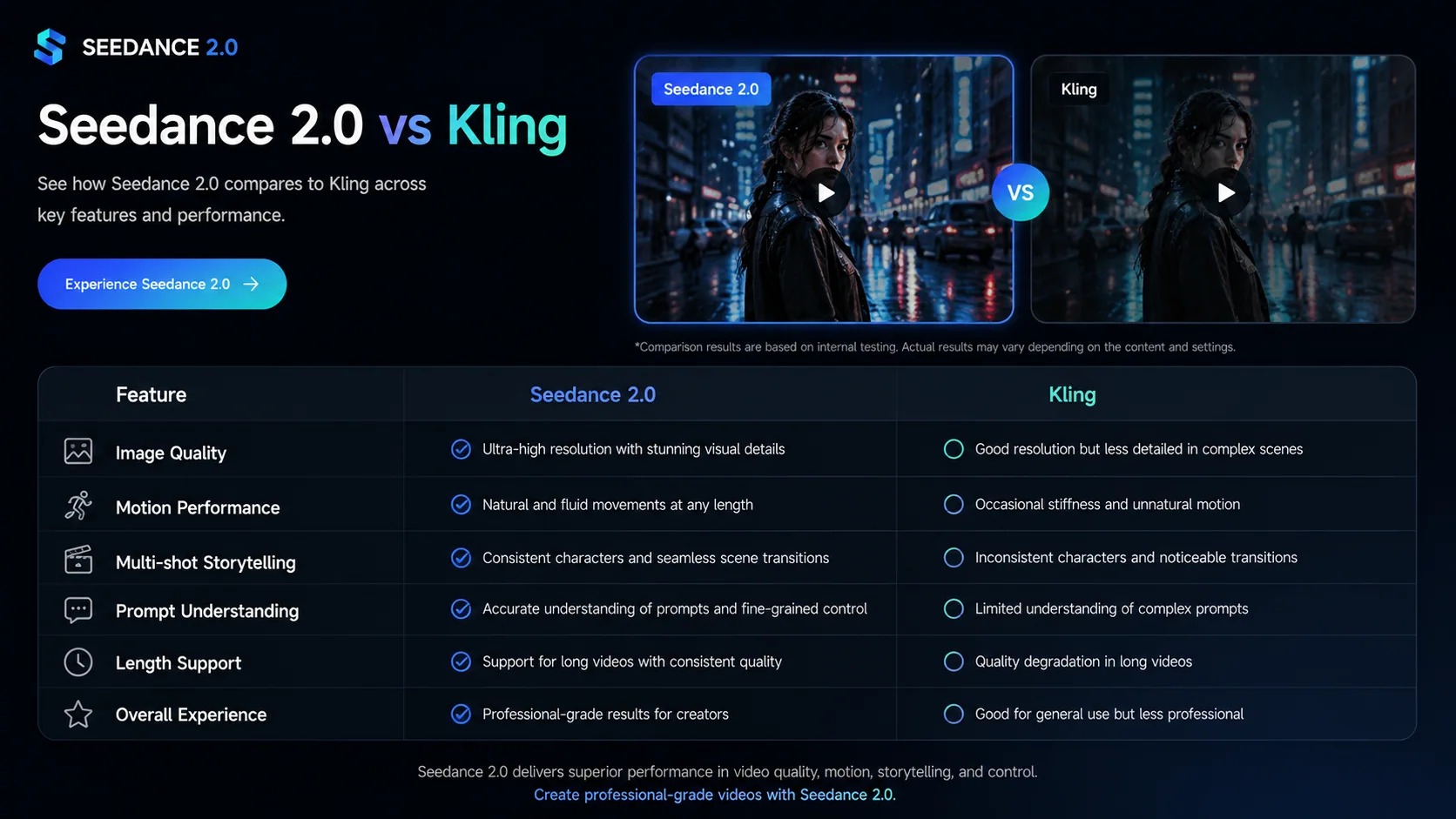
30-Second Verdict
Choose Seedance 2.0 if you need multi-reference generation for campaign-level visual consistency, prefer one-time credit packs over monthly subscriptions, or want 1080p output with no watermark from the very first generation. Choose Kling AI if you want a free daily credit tier for zero-cost testing before any purchase, or need long-form video output beyond 15 seconds. On pricing, both tools are broadly similar at the standard tier; the structural difference is free trial access (Kling) vs. immediately publishable credit-pack output (Seedance 2.0). Access Seedance 2.0 at https://seedance2-video.com — credit packs from $15, no subscription required.
Capability Overview
| Feature | Seedance 2.0 | Kling AI |
|---|---|---|
| Text-to-video | ✓ | ✓ |
| Image-to-video | ✓ | ✓ |
| Multi-reference generation | ✓ | — |
| Native audio generation | ✓ | ✓ |
| Free tier | — | ✓ |
| No-subscription credit packs | ✓ | — |
| 16:9 / 9:16 / 1:1 aspect ratios | ✓ | ✓ |
| Commercial usage rights (paid) | ✓ | ✓ |
Pricing Comparison
Kling offers a free daily credit tier; Seedance 2.0 offers one-time credit packs with no subscription required. Both have comparable standard-tier pricing.
| Tier | Seedance 2.0 | Kling AI |
|---|---|---|
| Free | Not available | Kling Free — ~66 credits/day (720p, watermarked output) |
| Entry | $9.99 one-time Starter Pack | Kling Basic — $8.99/month (660 credits, 1080p, no watermark) |
| Standard | $29/month subscription | Kling Standard — $28.99/month (~3,000 credits/month) |
| Pro | Yearly plan from $14.9/month (~50% off vs monthly) | Kling Pro — $68.99/month (~8,000 credits/month) |
Prices are standard published rates as of May 2026. Kling free tier output is 720p with watermark; paid tiers unlock 1080p and remove watermarks.
How They Compare
Generation Modes
Both platforms support text-to-video and image-to-video generation. Seedance 2.0 adds a multi-reference mode that lets you combine multiple images as style or subject anchors — useful when you need visual consistency across a campaign. Kling focuses on text and image inputs without multi-reference composition.
Model Focus
Seedance 2.0 is purpose-built around the Seedance 2.0 model from ByteDance — the same model powering high-quality cinematic and action clips. If you specifically want output from this model, this platform gives you the most direct access with the cleanest interface. Kling runs its own proprietary models, which produce strong results but in a different visual style.
Subscription Flexibility
Kling requires a monthly subscription to unlock paid features including 1080p output and no watermark. Seedance 2.0 offers both subscriptions and one-time credit packs — so you can generate without committing to a recurring plan. This matters if your video production volume is irregular or project-based rather than continuous.
Audio Support
Both Seedance 2.0 and Kling 3.0 now generate native audio. Seedance 2.0 outputs synchronized stereo audio — background music, sound effects, and dialogue with multilingual lip-sync — as part of the unified model output. Kling 3.0 (released February 2026) added native lip-synced audio in a single pipeline. Veo 3.1 remains the reference if you specifically need spatial / 3D audio.
Free Access
Kling offers a free tier with approximately 66 daily credits — enough to generate one to two 5-second clips per day at standard quality (720p, with watermark). This is a genuine entry point for testing output quality before committing. Seedance 2.0 does not have a free tier but offers low-minimum credit packs for first-time buyers — a lower-friction entry point than a full subscription, but not the same as free.
In-Depth Analysis
Kling's Free Tier: Real Value or Extended Trial?
Kling AI's free tier provides approximately 66 daily credits — enough for one to two 5-second clips at standard quality, output at 720p with a visible watermark. This is a genuine advantage for creators who want to evaluate AI video quality before spending any money. You can generate dozens of test clips over a week to understand the model's output characteristics with zero financial commitment. The limitation is that free-tier output is not production-ready: 720p resolution and a watermark make it unsuitable for commercial projects, social posts where quality matters, or any client-facing deliverable. Seedance 2.0's $15 one-time Mini Pack provides clean, 1080p, watermark-free output immediately — a lower financial barrier than a monthly subscription, but not free. If your primary goal is testing before buying, Kling's free tier wins on zero-cost evaluation. If your goal is production-ready output as quickly as possible, Seedance 2.0's credit pack gets you there without a subscription.
Multi-Reference Generation: A Workflow-Level Difference
Seedance 2.0 supports multi-reference image input — you supply two or more source images to anchor subject identity, visual style, or environmental consistency across generated clips. This is particularly valuable for campaigns requiring a recognizable character or consistent brand visual across multiple scenes: you supply the reference images once and generate a series of clips that maintain that visual identity without extensive re-prompting. Kling does not offer multi-reference composition. Kling generates from a single reference image or text prompt, which is sufficient for most single-clip use cases. Maintaining consistency across a clip series in Kling requires disciplined prompt engineering and re-using the same reference image each time, which works but produces less reliable consistency than Seedance 2.0's structural multi-reference input. For campaign-level production where consistency is non-negotiable, Seedance 2.0's architecture is more purpose-built.
Regional Availability and Infrastructure
Kling AI is developed by Kuaishou (快手), a major Chinese short-video platform. Kling's international version is globally accessible, but its primary infrastructure and support operations are based in China. Access speeds, generation latency, and support response times may vary depending on your location relative to Kling's server infrastructure. Seedance 2.0 is built on ByteDance's international infrastructure and is designed for a global user base with multilingual interface support across multiple languages. For creators in the US, Europe, and Southeast Asia, Seedance 2.0 typically offers more consistent latency. For creators within China or who prefer Chinese-language tooling, Kling may offer a more native-feeling experience. Both tools are accessible globally, but infrastructure geography is a practical consideration for latency-sensitive workflows.
Pricing Efficiency: Credits Per Dollar at Standard Tier
Kling Standard at $28.99/month provides approximately 3,000 credits. At Kling's credit consumption rate, a 5-second clip at standard quality costs around 10 credits, yielding roughly 300 five-second clips per month — high volume at this price. Kling Pro at $68.99/month provides 8,000 credits. Seedance 2.0's $29/month plan provides comparable generation volume in its credit system. On raw cost-per-clip at the standard tier, the two platforms are broadly similar. The key structural difference is Kling's free tier (daily credits, watermarked) versus Seedance 2.0's one-time credit pack ($29): Kling requires no upfront spend to start generating, while Seedance 2.0 requires a minimum purchase but produces immediately publishable output. Creators who generate consistently at scale will find both platforms similarly priced; creators who generate occasionally will find Seedance 2.0's credit pack model more efficient than a monthly subscription.
Which One Should You Choose?
Choose Seedance 2.0 if…
- •You want output specifically from the Seedance 2.0 model
- •You need multi-reference generation for style or subject consistency
- •Your production volume is irregular — you prefer credit packs over subscriptions
- •You want a focused, single-model interface without extra complexity
- •You need globally consistent access with low latency outside Asia
Choose Kling AI if…
- •You want to test AI video generation for free before committing
- •You need 1080p resolution on a paid plan at a low monthly entry price
- •You prefer a platform with a wider selection of AI models and styles
- •You generate video consistently enough to justify a monthly subscription
Try it now
Try Seedance 2.0 without leaving this page
Generate a clip in your browser — same model, same output quality you just compared.

Want more generations? Yearly plan from $14.9/mo — Save ~49%
Frequently Asked Questions
- What is the main difference between Seedance 2.0 and Kling AI?
- Seedance 2.0 is a focused platform built around the Seedance 2.0 model from ByteDance, offering multi-reference generation and flexible credit-based purchasing. Kling AI is a broader platform with its own proprietary models, a free tier, and higher resolution output on paid plans. The right choice depends on which model output style fits your creative goals and whether a free testing tier is important to your evaluation process.
- Does Kling AI support multi-reference generation?
- Kling AI does not offer multi-reference generation. Seedance 2.0 supports combining multiple reference images as style or subject anchors, which is useful for maintaining visual consistency across a campaign or series of clips.
- Can I use either tool without a subscription?
- Kling AI offers a free daily credit allowance (~66 credits/day) that doesn't require a subscription. Seedance 2.0 does not have a free tier but offers one-time credit packs starting at $29 alongside subscriptions — no recurring commitment required. For testing before buying, Kling's free tier has a clear advantage. For immediate, watermark-free production output, Seedance 2.0's credit pack is the more practical entry point.
- Which tool is better for cinematic video output?
- Both tools produce high-quality cinematic output, but with different visual styles. Seedance 2.0 uses the ByteDance Seedance model, which is particularly strong for cinematic motion, action sequences, and nature footage. Kling uses its own proprietary model family with different aesthetic characteristics. The best way to judge is to test both with the same prompt and compare the output side by side.
- Do Seedance 2.0 or Kling AI support audio generation?
- Yes — both now do. Seedance 2.0 generates synchronized audio (music, sound effects, and dialogue with multilingual lip-sync) as part of its output, and Kling 3.0 added native lip-synced audio in early 2026. Veo 3.1 is still the pick if you specifically need spatial 3D audio.
- Is Kling AI available worldwide?
- Kling AI's international version is accessible globally, but it is developed and operated by Kuaishou, a Chinese company. Generation latency and service reliability may vary depending on your location relative to Kling's server infrastructure. Seedance 2.0 is built on ByteDance's international infrastructure and is designed for global use with multilingual support. Both tools are accessible outside China, but your experience may differ based on region.
- How does Kling's free tier compare to buying Seedance 2.0 credits?
- Kling's free tier gives approximately 66 credits per day — enough for one to two 720p, watermarked clips daily. This is useful for testing but not for production use. Seedance 2.0's $15 Mini Pack is a one-time purchase providing clean 1080p, watermark-free output with no recurring commitment. If your goal is evaluating output quality at zero cost, Kling's free tier wins. If your goal is immediate production-ready output, Seedance 2.0's credit pack is the more practical path.
- Which is better for maintaining character consistency across multiple clips?
- Seedance 2.0's multi-reference generation lets you anchor a specific subject or visual style across a clip series by supplying multiple reference images. This directly supports repeatable character consistency for campaigns, series content, or brand videos. Kling does not have multi-reference input — maintaining consistency requires careful prompt engineering and re-using the same reference image manually each time. For systematic, repeatable consistency across a clip series, Seedance 2.0's structural approach is more direct and reliable.
Try Seedance 2.0 yourself
Generate your first clip — no subscription required to get started.
Open Generator